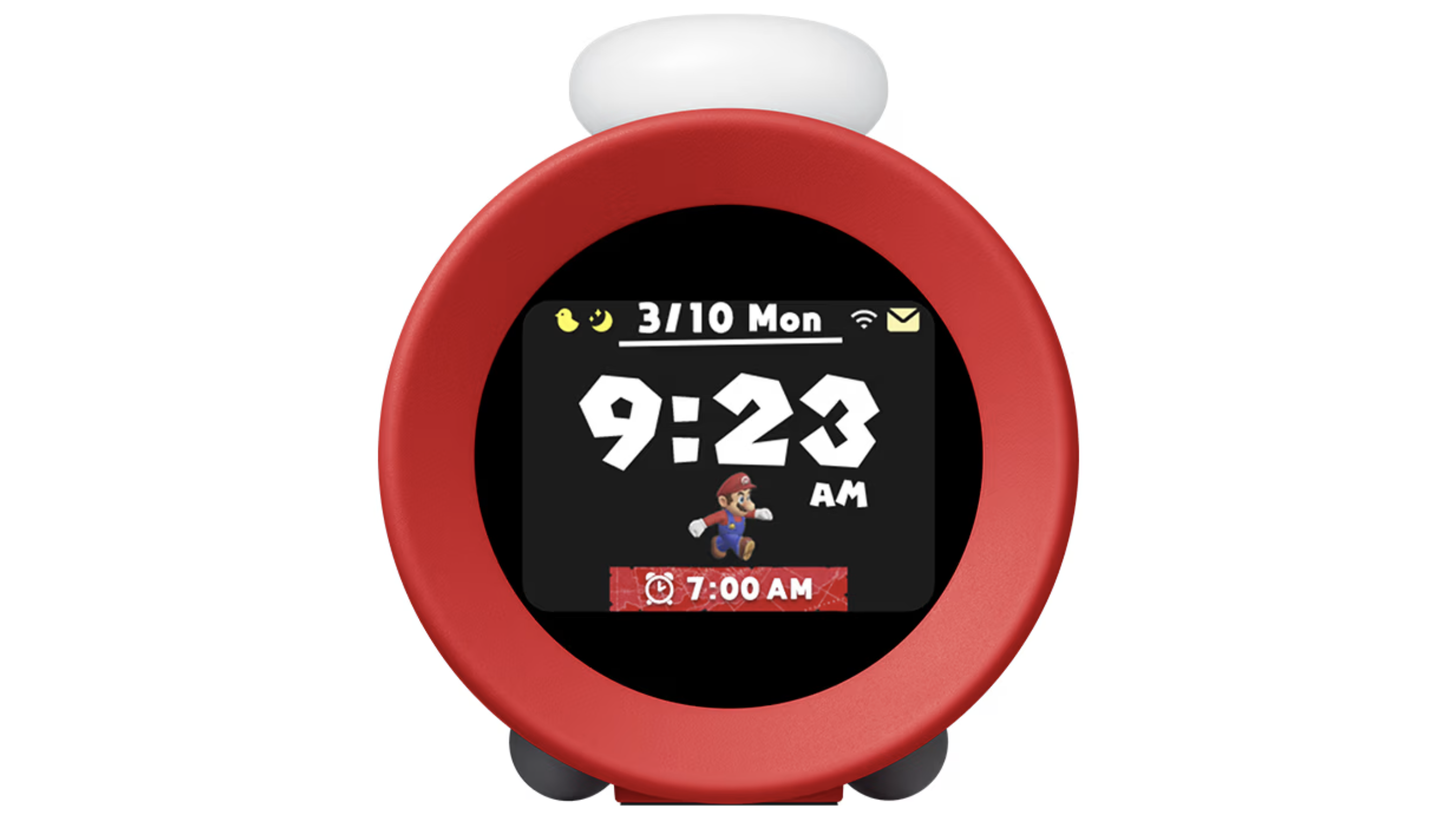

On October 9, 2024, after a particularly intense barrage of dubious “leaks” surrounding its upcoming Switch successor, Nintendo made what is, perhaps, the most on-brand move in the company’s proud 135-year history; it released an alarm clock.
Landing with absolutely no leadup and scarce fanfare outside of a simple launch video, the Nintendo Sound Clock: Alarmo arrived to a traditional blend of industry head-scratching and bemused optimism from the Nintendo faithful. Though not yet widely available—Alarmo can presently only be purchased at the Nintendo New York store, though pre-orders are open online for Nintendo Switch Online subscribers—this $99.99 gadget did somehow make its way into my hot little hands. Having spent the last couple of weeks with this cheery clock on my nightstand, I feel like I have a pretty good idea about what Alarmo does right and what could likely still use some tweaking.
View this post on Instagram
At its core, Alarmo is a motion-sensing clock that wakes you up to the unmistakable sounds of beloved Nintendo video game franchises rather than a standard tone. To snooze your alarm, wave your arms like crazy and Alarmo will let you sleep in a little. To turn off the alarm, simply get out of bed.
It’s a fun and really novel feature that actually works, and with 35 Nintendo-related wake-up options (called “scenes”) available, each drawing on iconic moments from titles like Super Mario Odyssey, Breath of the Wild, and Splatoon 3, there’s something for every fan. The integrated soundscapes are perfectly Nintendo and, at the risk of repeating myself, the motion tech really works!
This immersive sound experience is packaged in a small, red tabletop clock. On its front is a 2.8-inch rectangular LCD screen (set in a round face that also houses the motion and brightness sensors), with two smaller buttons and a large central confirm button/dial on top, and a USB-C port in the back for power. The overall look doesn’t exactly scream Nintendo—my girlfriend pointedly asked me where that “Pixar-lookin’ clock” came from—but powering it up, one is quickly pulled straight into the heart of the Mushroom Kingdom.
While the hands-free control works well enough for waking up, you still need a physical interface for setup, which is where that big white dial comes in handy. Alarmo walks you through the entire process—including testing the motion sensing, asking for things like your bed size and the distance from your nightstand, and specifying the relative positioning of the device—in about ten minutes using nothing more than the dial/confirm button and a separate back button.


Ok, admittedly a rotating dial is not the optimum means of inputting one’s Wi-Fi password, but it was responsive and intuitive enough that I managed to do it with only a bit of light swearing.
Alarmo’s other dedicated button is for notifications. Within the first few days of use, I had a regular parade of little envelope indicators popping up beside the screen’s Wi-Fi indicator letting me know that my Alarmo had something new to say. This included demoing secondary features like the hourly chime, relaxing Sleepy Sounds to help me wind down when I get into bed, and Records, its integrated sleep tracking system.
This is where I pause to point out that Alarmo is tailor-made for solitary sleepers. Having another body in the bed—be it a partner or a housecat or, in my case, both—has an overall detrimental effect on some of the device’s functionality. I found, for example, that changing the setting for bed size helped a bit with the alarm detection—as it concentrated the sensor range on my side of the bed—but not so much with the sleep tracking.
For those sleeping in /Blanche Devereaux voice/ shared boudoirs /Blanche Devereaux voice/, Nintendo recommends using Button Mode. Button Mode is available alongside the other alarm modes (Firm, Moderate, and Gentle) in the system settings. Obviously, this more traditional interface still allows users to experience the wonderful sounds of Alarmo, but, as it requires you to turn your alarm off using the confirm button/dial, it does so at the expense of that much-touted motion tech.

So, ultimately, who is Alarmo for? Obviously, Nintendo devotees will want one, and it’s certainly a good fit for enthusiasts—assuming that they understand the limitations. On the other hand, since Alarmo eschews a companion app, it’s a nice way to gamify sleep for younger fans who might not yet be ready for a sleep-tracking smartwatch or even a mobile phone.
In both cases, the real barrier here is price. At $100, Alarmo comes in at 20 bones more than the Echo Spot, Amazon’s smart clock/connected speaker with Alexa built-in. But while other options may edge it out with regard to cost and even features, what Alarmo promises is a touch of the old Nintendo magic, which (by design) can’t really be found anywhere else.
As such, I think of Nintendo Sound Clock: Alarmo less like a Switch or a Wii—products with a broad appeal that are easy to recommend for practically anyone—and more like, say, the early 2000s Game Boy-enabled Singer Izek sewing machine. It’s a pretty niche release with a very particular use case, but also one that superfans will be thrilled to have in their collections for years to come.
The Nintendo Sound Clock: Alarmo was provided by Nintendo of America for the purposes of this review. This post contains affiliate links. I still regret not ordering one of those Game Boy sewing machines!
Click through to read all of “It’s Mario Time – GeekDad Reviews Nintendo Sound Clock: Alarmo” at GeekDad.If you value content from GeekDad, please support us via Patreon or use this link to shop at Amazon. Thanks!