This summer’s Be the Artist series asks, “Who Made That?”
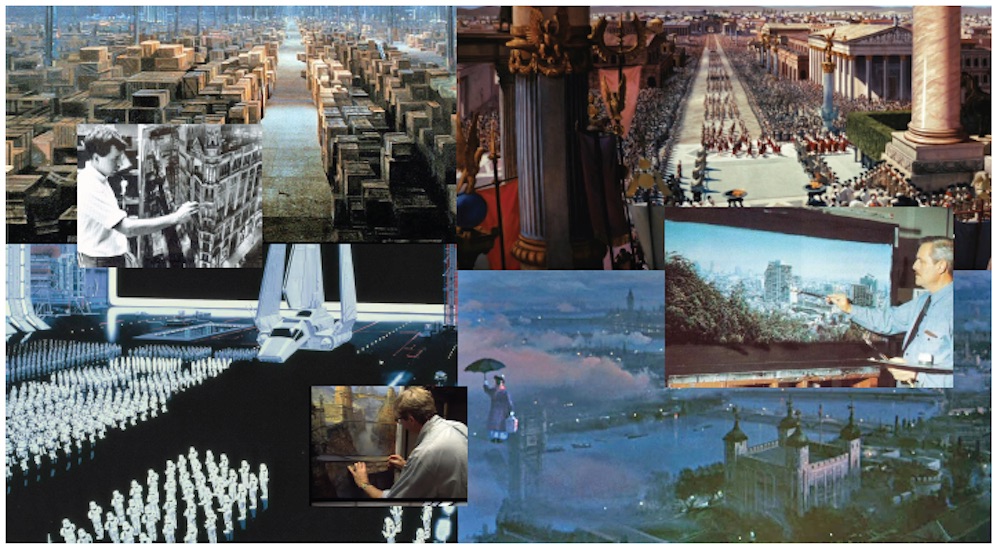
From Mary Poppins to the original Star Wars trilogy, practical effects were as important as the actors. Still, some of the most impressive visuals come from paintings done on glass, Masonite, or other large surfaces.
These are “matte shots.”
Just as CGI is more common in movies today, these realistic painted backgrounds made cinema seem more magical. This is the work of matte painters. These might not be as familiar as some special effects artists or costume designers, but matte painters were vital members of a movie’s world-building team.
Who were the matte painters? Well, many, many people.
For example, the beautiful streets of London in Mary Poppins, the islands of 20,000 Leagues Under the Sea, and many other Disney classics were created by Peter Ellenshaw. The overhead building scenes in Ghostbusters II were glass paintings from an artist named Mark Sullivan. Matte artists created the massive crowd scenes in Ben Hur, and the warehouse at the end of Raiders of the Lost Ark by artist Michael Pangrazio is one of the most famous to date.
Ellenshaw, one of the best-known, was born in England and began drawing as a child. His mom would give him paper and pencil to draw with when they were hiding under the table during WWII drills. He was self-taught and finally was taken on by Disney in the early 1950s. He won an Academy Award for his work in Mary Poppins but painted from the ’30s to ’90s in films from Treasure Island to Dick Tracy. He passed away in 2007, and his son, Harrison Ellenshaw, followed in his footsteps as a prolific matte painter as well, including work with ILM.
Matte paintings in movies are as old as the business itself and are not just thrown together. First, concept images are created, and then images are placed with live-action footage to see how they match up. If it is what the filmmakers want, a final painting is created. This is just a simplified explanation, but it does take a few steps to get there.
Sometimes matte paintings are part of real-life images, like stormy skies in a background or pirate ships in a harbor.
Here’s a portion of an interview with Ellenshaw on how he got his start, as well as a little history on the art form of matte paintings itself:
Even a single painting can be an important part of the movie. Remember the massive “Vigo the Carpathian” image from Ghostbusters II. It is actually a perfectly lit photograph of actor, Wilhelm von Homburg. Director Ivan Reitman wanted something frightening, but he wasn’t satisfied with the character ideas from the special effect artists. He found an artist named Glen Eytchison, who worked with the famous California arts festival event, Pageant of the Masters, which turns live models into famous works of art. Eytchison carefully posed the actor on a background lit to make it look flat and shot the image head-on. The result of the lighting, carefully designed costumes, set pieces, and makeup created a beautiful and eerie painting. The original concept photos are now in the ILM offices and with collectors.
Smaller paintings, such as Bert’s sidewalk chalk art in Mary Poppins, were also important. Bert was working as a “screever” (pavement artist), and a scene showing his hand painting in the film was that of Ellenshaw himself.
Matte paintings have captured everything from gothic horror castles to retro billboards to futuristic city skylines. The practice is still used today, but many now are digital artists.
Whether digital or by hand, the key to good matte shots is painting, and Ellenshaw said that was what he did all the time to bring some of the greatest films in cinema to life.
“I was taught how to paint, and I knew how to paint,” he said. “I’d paint my head off.”
For this final Be the Artist project of the summer, we are going to do two things:
First, paint a background for a film. This one you can do on plain drawing paper or a cheap canvas… or even a piece of white cardstock.
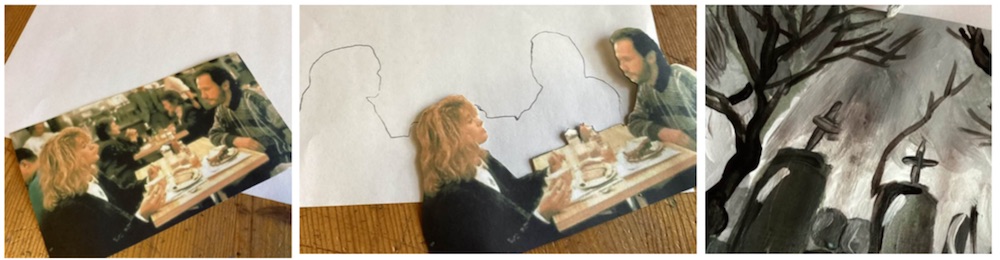
Find a film or television show image that you want to change to a more spectacular location. One of those “talky” dramas or rom-coms usually set in someone’s home, café, a courtroom drama… hospital drama… or even a western set mostly in the desert. Find a still shot of one or two of the characters and print and cut out the characters. Place them where they might go on in their new environment.
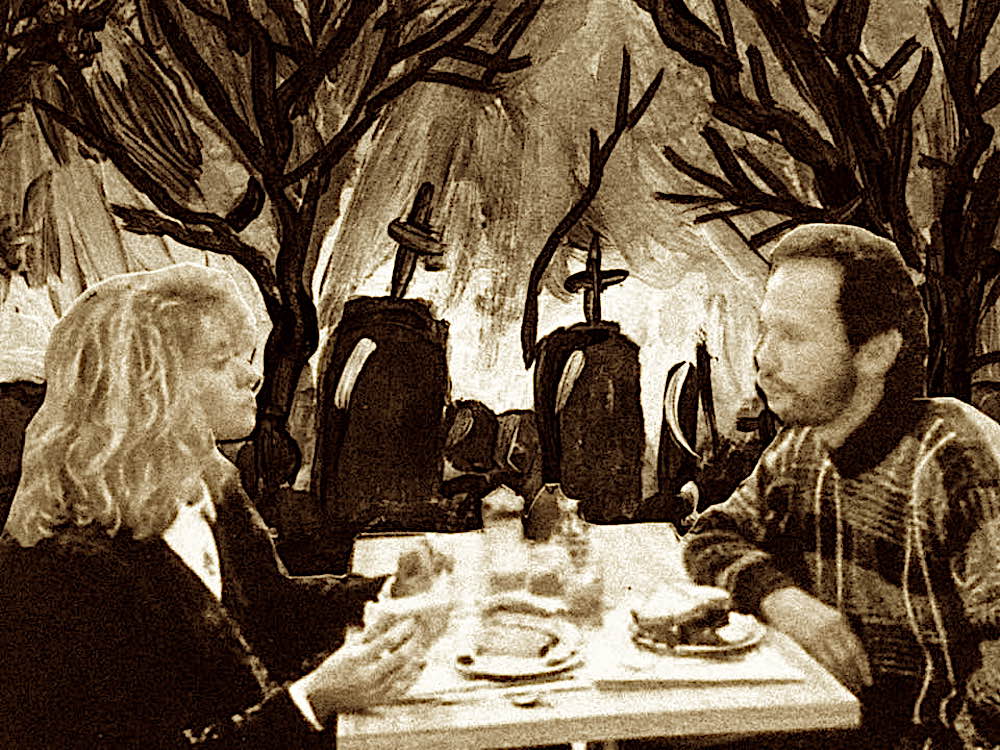
Trace lightly around them, so you have a reference of where they will go, and then remove the cutouts. Paint, draw, or doodle a new background. It’s up to you how realistic you want to make it. Sometimes, cool doodles look great as backgrounds. This is where you rebuild the world! It will take those characters and move them to a new location. It can be as simple as a specific city or as crazy as a new planet or enchanted world. Use whatever medium you wish. If you are lousy with brushstrokes, try colored pencils or crayons.
When finished, look for your outline and replace the character images. There you have it—an old story in a whole new world.
Next, take a background and give it a new character! First, print out a background (even one from another movie) or find one in a magazine. Travel catalogs have some great images, as well, if you need inspiration.
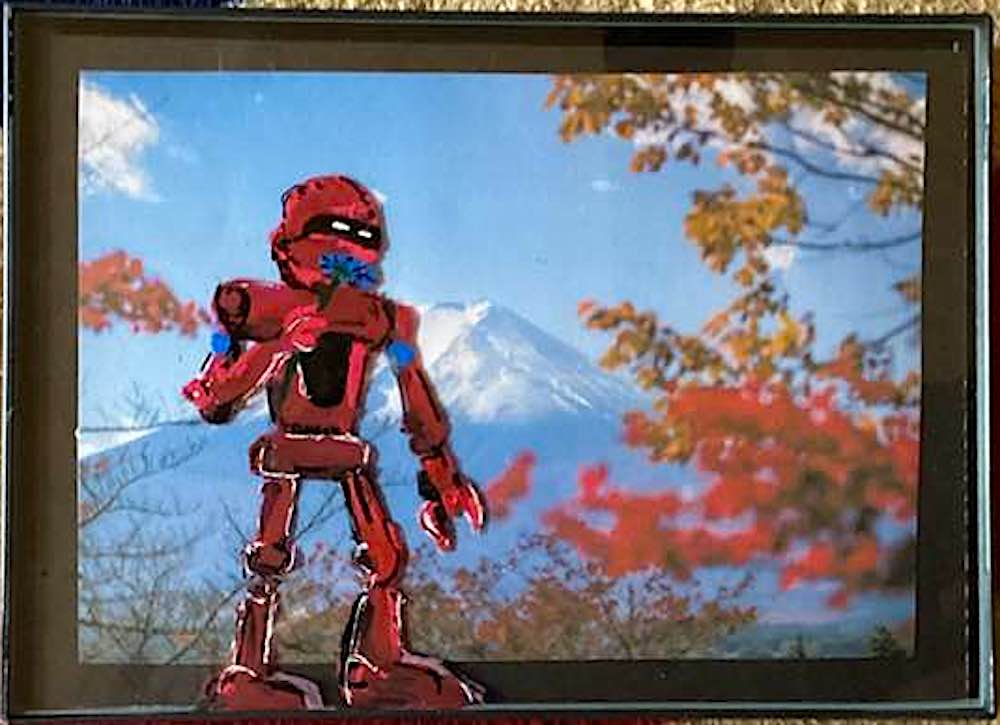
Take a piece of a small, cheap picture frame and remove the glass. You can find small frames with Plexiglas at dollar stores if you are worried about handling actual glass.
Place the glass over the image you’ve found and use paint markers or paint to place a character over it.
It is amazing how the background of a movie, the things we don’t focus on, can literally “paint the picture” of where and when a story takes place.
A beautiful landscape may look different with a big kaiju or robot in the foreground. Maybe a monster is visiting a peaceful meadow or a sea creature found its way into a cityscape.
It’s all about imagination. Once done place the glass and the image behind it back in the frame, and you have a small, original “movie still.” How exciting!
Filmmaking is all about imagination, and when you have the right artistic minds it is an exciting journey, as Ellenshaw said at age 90. (He was still painting all the time.)
“Life is exciting if you make it so,” he said.
This post was last modified on September 7, 2024 10:55 am
Trans rights are human rights. In a world where trans rights keep being taken away,…
I really didn’t want another story about a young adult attending a magical school, but…
Bring springtime and color into your home with Marimekko stationery items.
The fight between winter and the onset of spring is something we know well in…
Out today is the newest Mouse Guard book, 'Mouse Guard: Dawn of the Black Axe'—and…