Ever since I learned that small, thin, extremely portable external monitors existed, I’ve been intrigued. Though my mind hadn’t yet imagined all of the possibilities of such a peripheral, I knew how versatile they’d be. You could use one to expand your computer desktop space. You could show what’s on your screen to a larger group. You could have a smaller-than-normal laptop and use the external monitor to have more screen space. You can use its touchscreen capabilities along with a computer that has no touchscreen. And so on.
I recently got the chance to try out one of this type of external monitor, a Vissles-M from the Vissles company. If you’ve never heard of the Vissles company, you’re not alone. They’re an electronics company based in Asia that offers a variety of products, such as headphones, wireless chargers, screens, keyboards, and more. If their other products have the same quality as this monitor, I’ll be happy to see their products more widely distributed.
For my home desktop computer, I use a really large monitor to make it easy to have several windows visible at once. But for laptops, I feel the lack of enough monitor space in comparison. Since the Vissles-M external monitor isn’t too large, it would be easy to lug around with you along with a small laptop, probably even easier than using a larger, heavier laptop. Having this monitor would give you options, to increase your productivity or just give you space to spread out.
The company claims this monitor can connect to many different types of hardware, including computers, laptops, game consoles, the newer iPad Pros, and even Android phones. It supports Windows, MacOS, Android, Linux, Nintendo Switch, Xbox, PS4, and more. My house lacks most of the above options, however, but I knew I’d be able to try it out on both old and new Windows computers, at least. Check the website for a list of supported devices.
The Vissles-M arrived well-packaged in its box snuggled in with plenty of high-density foam to protect all the components. In the box you get:
No real setup is required, other than using the proper connections for your device. Once it has power and a signal, it comes to life. The ports in the monitor include:
The monitor has a nice 16:9 landscape orientation that is ideal for watching movies or for snapping a couple of portrait-oriented documents side by side. Some other features of the monitor include:
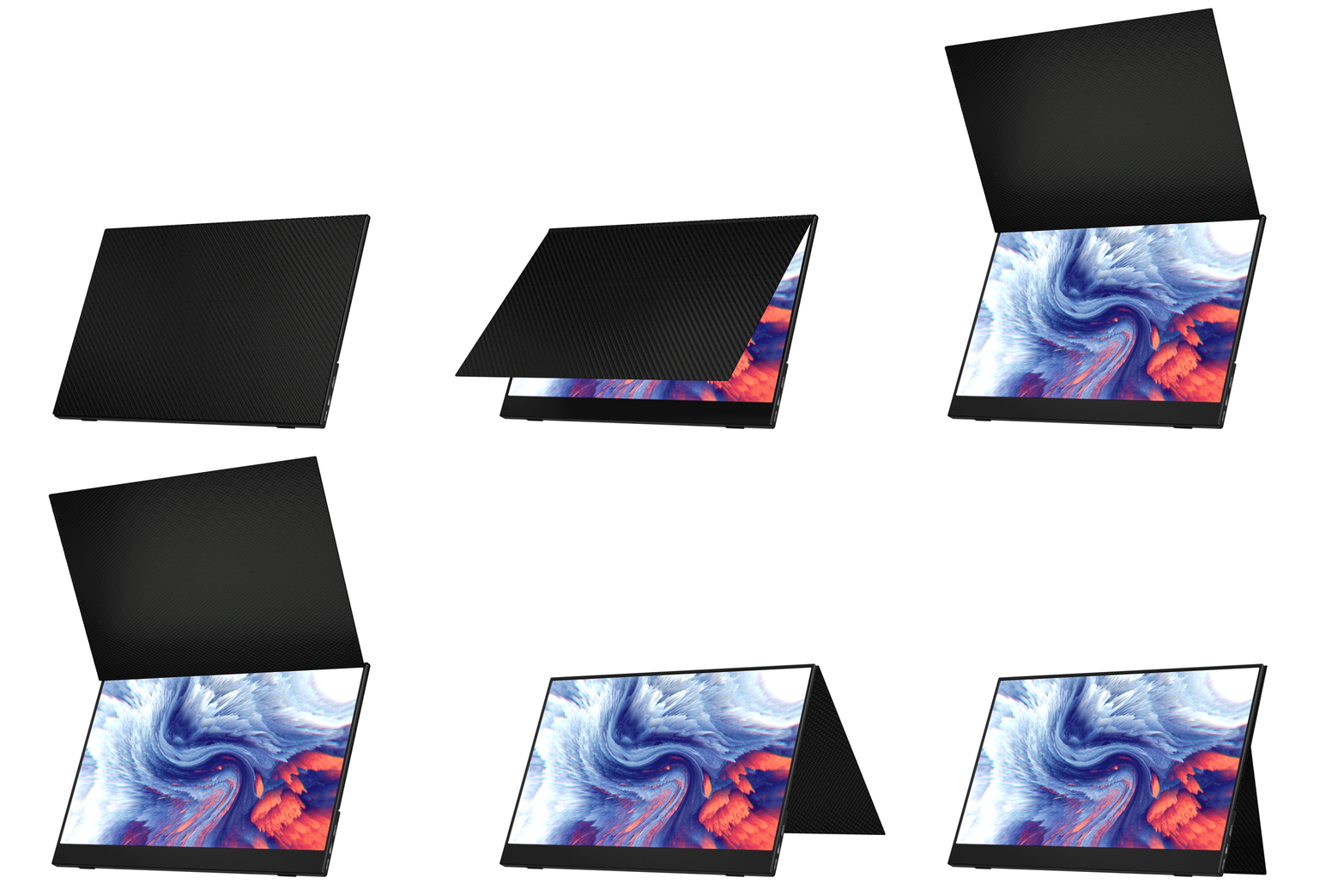
Before even plugging it in, the first thing I noticed about the Vissles-M monitor was the unusual cover/stand. It’s completely removable and held on by sufficiently strong, strategically placed magnets, but it’s a bit flimsier than I would wish for. And it wasn’t immediately clear how to use it as a stand; it took some experimentation. The stand is a bit awkward to adjust and doesn’t lock into any position. It does the job, but I wish instead that there was a built-in kickstand, as with the Surface Pro, and then also a separate cover or sleeve. In any case, here’s a helpful GIF to demonstrate how the cover/stand works.
I tried the monitor first with my daughter’s brand new Dell XPS 13 i7 laptop using the USB-C to USB-C cable. The monitor immediately started up and mirrored her screen. There was no fiddling. Going into the Windows settings, we were quickly and easily able to turn it into a second monitor by extending the screen instead of mirroring it. The touchscreen worked exactly as you would expect.
In the mirrored screen mode, we tried watching a video as a family, with half of us watching the laptop and the other half the monitor. This had some pros and cons. Pro: We were able to each watch the video without crowding around a single screen. Con: The sound only came out through the Vissles-M, whose maximum volume wasn’t really sufficient for an ideal group-watching experience. Fortunately, the monitor does have the 3.5mm headphone jack which can also be connected to a speaker, but then you’ve got yet another thing connected by a cable, which can make the setup as a whole unwieldy.
Next I connected the monitor to my considerably older Dell XPS laptop which included no USB-C ports. For these types of computers, you connect both the HDMI cable and the USB-C-to-USB-A cable, as the former offers video/audio signal and the latter the touchscreen signal and power supply, according to the user guide. Other than having two cables connecting the two devices, it worked in the same manner as for the newer laptop. I think one of my USB ports is a bit wonky, though, as the monitor kept restarting itself. Moving to another port was more stable. (I couldn’t replicate the issue on my son’s also-old laptop, so I blame my ports.) One less-than-ideal thing I noticed was that whenever my laptop screen would go to sleep—naturally also making the Vissles-M go to sleep—my laptop made the “I just unplugged a peripheral” sound, then made the “I just plugged in a peripheral” sound when I woke it back up. But if you aren’t constantly leaving and coming back to the device, this shouldn’t be a problem. You can also adjust how often your screen goes to sleep.
Though you can also use the monitor with a newer iPad Pro (the ones with a USB-C port), an Android phone, and a gaming console, we don’t have any of those to test. But I imagine they’ll work well, as the monitor did with our other devices.
A few caveats that I wasn’t able to test, but the company communicated to me:
The Vissles-M monitor retails for $229 but is on sale right now on their website for $199. It comes with a one-year warranty. (You can also get it through Amazon.) For a portable, external, touchscreen display, the Vissles-M is a good deal, and it also works well to display your media or as a second monitor. I recommend this versatile solution to anyone who has a small laptop and needs more real estate, needs to share their display with a larger group of people, or just wants a second monitor. It would also work well for group D&D sessions!
Note: I received a sample for review purposes. This post includes affiliate links.
This post was last modified on November 13, 2020 3:28 pm
Trans rights are human rights. In a world where trans rights keep being taken away,…
I really didn’t want another story about a young adult attending a magical school, but…
Bring springtime and color into your home with Marimekko stationery items.
The fight between winter and the onset of spring is something we know well in…
Out today is the newest Mouse Guard book, 'Mouse Guard: Dawn of the Black Axe'—and…